
How does ooTunes work?
See Exhibit A (it's worth ~1024 words!)
Prefer long, poorly written text descriptions? Read on!
Exhibit A
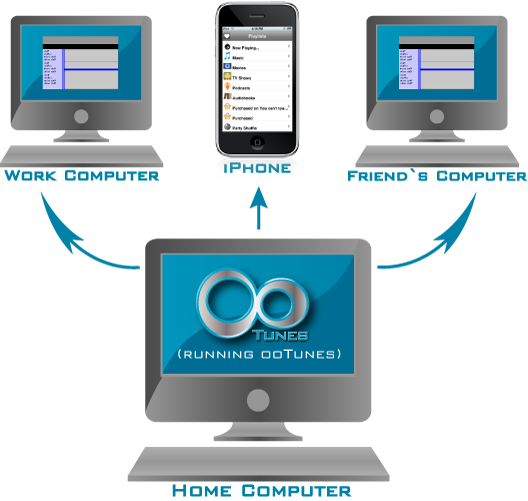
Want to listen to internet radio from your iphone or ipod touch? All your music/videos won't fit on your iphone at once? How? HOW!??! TELL ME DANGIT!!!!!!!!
Stop yelling please.
ooTunes works like this:
You run ooTunes media server on your personal computer (mac, windows or linux). That computer must be on, logged in, running ooTunes, and connected to the internet for you to listen/watch from afar.
Next, take 1 iPhone (or anything with a web browser) put in your own nifty ootunes.com domain (sorry, nifty.ootunes.com is taken... or is it?) and we direct you to your computer running ooTunes. Magically, you can stream your library, or listen to radio streams, even if they don't normally play on your iPhone.... How is this possible? ooTunes uses the fancy-shmancy and free VLC media player to convert unplayable things into playable things. That's it, in a nutshell...
So, you (like many before you) may be wondering, "Will ooTunes let me listen to (insert radio station) from my iPhone?" or "Will I ever love again?" Well, the answer is maybe. If your favorite station isn't already known to work and it has an online stream, and you can get the url to it, contact us, and we'll let you know if it will work.
What's more? We'll sell you your own server (minus the computer, internet, power cords, peripherals, and dirty keyboard) for only $20. Are we crazy? Yes in fact... thanks for asking.
Questions? See the FAQ or contact us!